What can WhatsApp do by itself?
It can do three things. For a note that only you need, that is enough:
- Message yourself. A chat with your own number, handy as a notepad.
- Pin and star. Pinned messages stay at the top of the chat for 24 hours, 7 days or 30 days. You can still find a starred message after that.
- Voice messages as text. WhatsApp transcribes voice messages you receive if you turn this on under “Settings” › “Chats”. On Android this only works in English, Portuguese, Spanish and Russian so far. On the iPhone it works in German too.
Checked on 9 October 2026 in WhatsApp’s help centre.
And WhatsApp’s “Lists”? They are not what the name suggests. They sort your chats into categories you choose, such as family, work or neighbours, so you can find the right conversations faster. WhatsApp describes them like this: “With Lists, you can now filter your chats with custom categories of your choice.”
That is not a list of things to tick off, and WhatsApp does not have one. If you keep a shopping list in WhatsApp, you write it as a message. Checked on 12 September 2026 against WhatsApp’s own announcement.
Where does WhatsApp stop?
The list sits in a chat and belongs to one person. Nobody else sees it, and nobody can tick anything off. Things that are done just stay there.
“Dentist Thursday at 3 pm” does not become an appointment, and a photo of the bill does not become a receipt. And to find something later, you scroll back through a chat.
What does moj make of it?
moj has its own number. You send it what you would otherwise type into the chat, and moj files it:
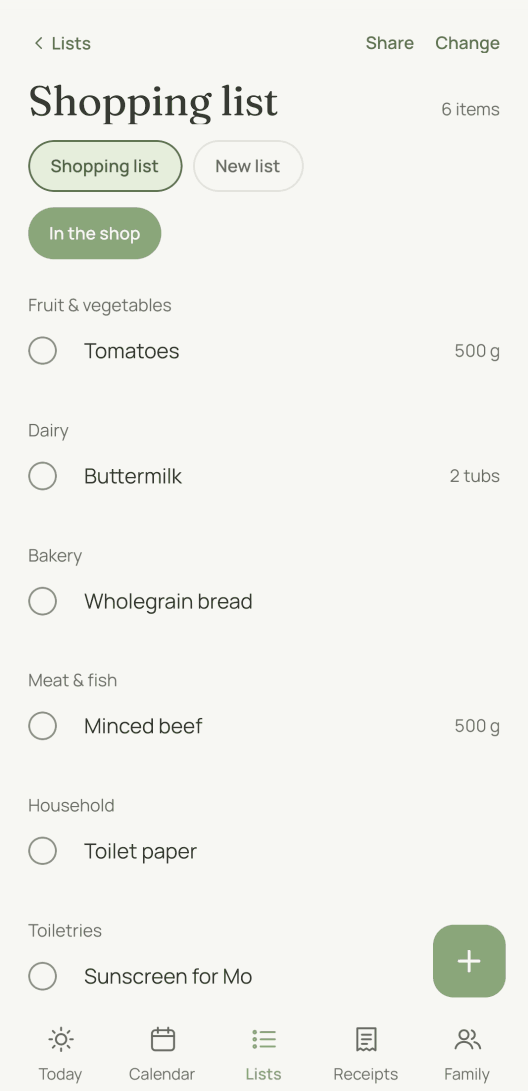
- “Milk and toilet paper” goes onto the shopping list, sorted by supermarket area.
- “Dentist Thursday at 3 pm” becomes an appointment in the family calendar.
- A photo of the bill becomes a receipt, with amount and due date.
- A voice message is turned into text first, and the reply quotes what moj heard.
What comes back is one line, not a conversation. If something is wrong, reply “undo” and the last entry disappears. The family sees the result in the app, each on their own device.
What can’t moj do?
No family group. Each member writes to the moj number on their own. That was a deliberate decision. In moj you share the result, not the chat.
WhatsApp is a way in, not the app. You read, change and tick things off in moj.
Meta carries the message. It is end-to-end encrypted as far as Meta’s interface. There Meta decrypts it and passes it to moj over an encrypted connection so that moj can read it. Meta keeps it for this purpose for 30 days at most. What moj stores after that is set out in the privacy notice. Checked on 9 October 2026 with Meta.
In the Swiss App Store since 6 October 2026. Germany and Austria will follow, and Android by the end of the year. As of 12 October 2026.
Short answers
How do I make a shopping list on WhatsApp?
You write it as a message. The easiest place is WhatsApp’s “Message yourself”, a chat with your own number. Pin or star the message so it is easy to find again. WhatsApp has no dedicated feature for lists you tick off.
What is the “Lists” feature in WhatsApp for, then?
It sorts chats, not things. Lists are categories you choose yourself, such as family, work or neighbours, and they filter your conversations. Despite the name, they are no help with a shopping list.
Does my family see this list too?
No. A list in your chat stays in your chat. For anyone else to read it, you need a group. And there it is still just text that nobody can tick off.
What does moj do differently?
moj reads the message and files it. Milk goes onto the shopping list, “Dentist Thursday at 3 pm” into the calendar and a photo of the bill among the receipts. Everyone in the family sees the same result in the app.
Do I need a WhatsApp group for this?
No. moj deliberately has no group. Each member writes to the moj number on their own. What you share is the result in the app, not the chat.
Do voice messages and photos work too?
Yes. A voice message is turned into text, and the reply quotes what moj heard. That way you can correct a misheard word. moj reads photos and PDFs up to 20 MB, and a bill becomes a receipt.
What happens if moj files something in the wrong place?
You reply “undo”. That takes back the last entry you sent.
As of 12 October 2026. Questions about it go to hallo@heymoj.app. There is more about moj on the front page. What happens to “Dentist Thursday at 3 pm” is on the page about the family calendar app.
Will you send your next list to moj?
moj is the family planner you simply send things to: by WhatsApp, as a voice message or as a photo. It all ends up sorted, where everyone can see it.
In the Swiss App Store since 6 October 2026. Germany and Austria will follow, and Android by the end of the year.
Not available for you yet? Leave your address and we will let you know.
One mail to confirm, one at launch, none after that.