How do you get the birthdays from your contacts?
You tick them in a list. We did not build a button that simply takes everything.
The phone reads its own address book and keeps only the contacts with a birthday. That is usually a handful out of several hundred entries. Those are the ones you see, and you tick the ones you want.
Only the name and birthday of exactly these people reach moj. No phone number, no address, no email. The address book itself never leaves the device.
In an address book a birthday without a year is normal, and it is not lost here. moj keeps it as a birthday with an unknown age and reminds you all the same. It simply shows no age.
If you prefer typing, create the person by hand. New people are always created in the app, never by message. A person is not something you add in passing.
How does moj remind you of a birthday?
It reminds you three times, early enough to still do something about it: 21, 7 and 1 day before, each time in the morning.
The message does not just say whose birthday is coming up. It also tells you how many gift ideas for that person you already have. If there are none, it says so. That is the difference between a useful reminder and one that only nags.
Nothing rings at night, because these three are never due at night. They are tied to your morning time, not to the time of the birthday.
If you don’t want them, switch off “Heads-up before birthdays” in the settings. The other reminders are not affected.
The switch applies to all birthdays together. If you want a reminder for just one, create an appointment for it with “Only me” and a reminder.
Where else do the birthdays show?
They appear wherever you look anyway. There are four places:
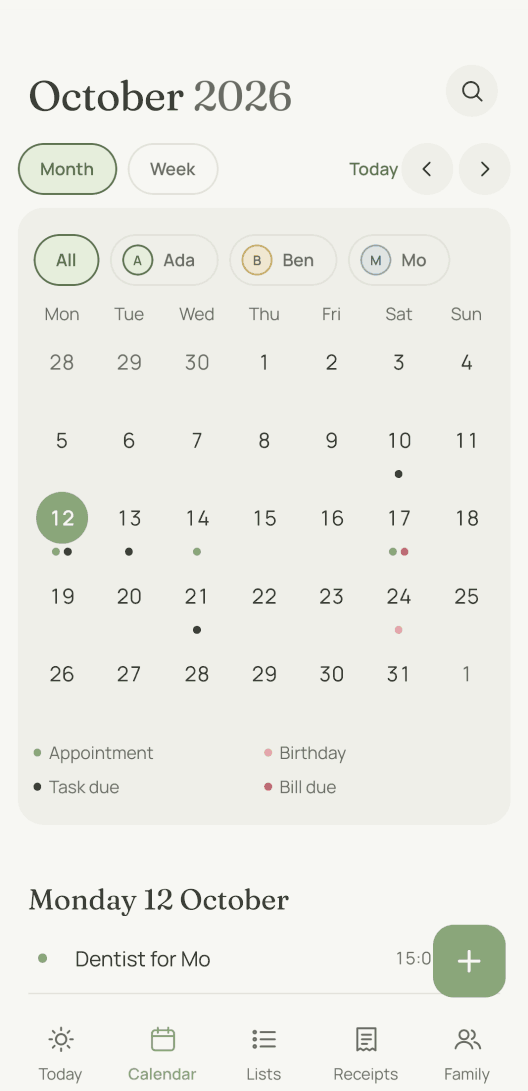
- In the family calendar, with their own dot beside appointments and due dates, and with the age the person turns that day.
- On the app’s start screen on the day itself, with the gift ideas underneath.
- On the kitchen display, which is the page for a tablet in your kitchen, if you have one.
- In the calendar subscription, which Apple Calendar and Google Calendar can read.
In years that are not leap years, a birthday on 29 February is celebrated on the 28th. That was a deliberate choice. Better a day early than not at all.
Who sees a gift idea?
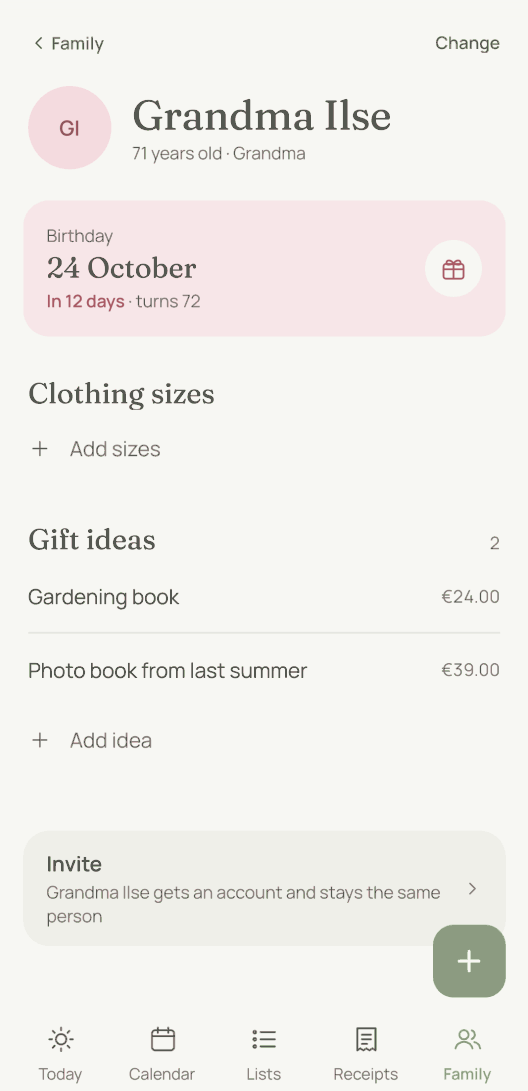
Everyone sees it except the person it is meant for. “Gift idea for Grandma Ilse: a gardening book” is filed with Grandma Ilse, and Grandma Ilse sees none of it.
Gift idea for Grandma Ilse: a gardening book20:31
Idea saved: Gardening bookReply with “undo” to take that back.
We deliberately left out a switch for this. A “secret” tick box would be exactly the box someone forgets at the wrong moment. Then the surprise is out in the family space for everyone to see.
A rule decides instead, and it has two halves. What someone else noted for you stays hidden from you. What you note for yourself is a wish, and everyone can see it. The only person ever left out is the one it is about.
An idea has a price, an occasion and a status: “Idea” or “Given”. Anything given stays with the person. A year later, that is the most useful list there is.
Children and caregivers neither see nor create ideas. If Mo wants to collect ideas for Dad, create a checklist that only Mo and Mum can see. Mo then writes “Lego on the gift list”, and Dad sees none of it.
What else is on a person’s page?
There are five lines, exactly the ones you need just before a birthday and can never find. They hold sizes for tops, trousers, shoes and hats, plus a line “Wish” for something this person once wished for.
We deliberately left out any further fields. A person’s page that turns into a form never gets filled in.
Two more things are there all the same, and moj takes care of both. Every person has a colour, so in the calendar you can see at a glance who an appointment is for. And a note that names a person appears on their page. You find what the doctor said there, not in a list of every note.
Someone without an account may only be around for a while, such as a cousin who is visiting. In that case, open “Change” on their page and set “Right now” to “Not around”. They then no longer appear when you pick people. Old entries and their birthday stay.
And if you live across two homes, a person belongs to the household they live in. The full rules are on Who sees what.
What can’t the birthday calendar do?
Nothing goes back into the address book. It only works in one direction. If you change a birthday on your phone, it does not change in moj, and the same is true the other way round.
No automatic greetings. moj sends nothing in your name, neither a message nor a card. The congratulations are up to you.
No gift shop. There are no suggestions from a catalogue, no affiliate links and no commission. An idea is what one of you wrote down.
Removing a person does not remove their ideas. The gift ideas stay, but afterwards they belong to nobody. The app tells you this first.
As of 12 October 2026. In the Swiss App Store since 6 October 2026. Germany and Austria will follow, and Android by the end of the year.
Short answers
How do I get birthdays from my contacts into the calendar?
In the app, with “Birthdays from contacts”. The phone reads your address book and shows you only the contacts that have a birthday entered. You tick the ones you want in the family, and only their name and birthday reach moj. The address book itself is never uploaded.
How do I make a birthday calendar?
There are two ways, both in the app. You take the birthdays from your contacts, or you create a person by hand and enter their date. After that the birthday appears in the calendar every year by itself, without anyone entering it.
What is the best birthday app?
That depends on what you are missing. Most remind you reliably, and if that is all you need, that is enough. moj is built for the next step. The reminder comes early enough to still get something, and it tells you how many gift ideas you have already collected for that person.
Does the person getting the present see the gift idea?
No. What someone else notes for you stays hidden from you, without anyone having to tick a box. It works the other way round too: what you note for yourself is a wish, and everyone can see it.
What happens with a birthday without a year?
It still counts. Many address books store only the day and month. moj records it as a birthday with an unknown age and reminds you all the same. It then shows the day without the age.
As of 12 October 2026. How birthdays fit into the calendar alongside everything else is on family calendar app. Everything moj does is under Features.
Would you rather no birthday slipped past you again?
moj is the family planner you simply send things to: by WhatsApp, as a voice message or as a photo. It all ends up sorted, where everyone can see it.
In the Swiss App Store since 6 October 2026. Germany and Austria will follow, and Android by the end of the year.
Not available for you yet? Leave your address and we will let you know.
One mail to confirm, one at launch, none after that.