How does something get onto the shopping list?
You send it: “Milk and toilet paper on the list” on WhatsApp, as a voice message from the car or typed in the app. It all ends up in the same place.
A single line comes back. If something is not right, reply “undo” and it disappears.
Milk and toilet paper on the list17:42
Milk and toilet paper on the shopping listReply with “undo” to take that back.
Two things in one sentence become two lines, not one. And if you give a quantity, it stays with the item. “Two litres of milk” becomes milk with the quantity two litres, because in the shop the number is half of what you need to know.
What order is the list in?
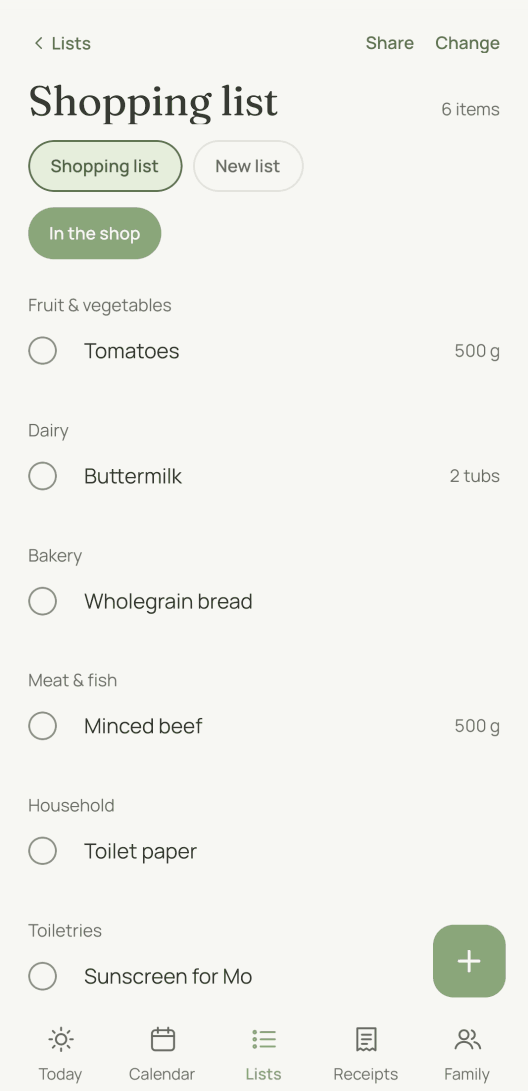
It follows the eleven areas a supermarket is laid out in, from fruit and vegetables to toiletries. moj puts every item in its area as it files it. You do not sort anything.
An alphabetical list sends you from the apples to the toothpaste and back again. This one follows the route you walk anyway.
The same order exists on paper. The printable shopping list uses the same areas, so the printed list and the digital one never follow two different orders.
Does everyone see the same list?
Yes, everyone in your household, each on their own device. Anything one person ticks off is ticked off for everyone. Another household in the same family space has its own list.
Ticked-off items move to “Recently bought” instead of vanishing without a trace. When you are standing in the shop, you want to see what the others have already got.
If someone adds something while you have the list open, it shows up within half a minute at most. Pull down on the list to fetch it straight away.
If you say who is bringing something, their name appears beside the line. “Sparkling wine, I’ll bring that” becomes “Sparkling wine” with your name. The person doing the shopping can then see what someone else has already taken on.
If you create a second household, it gets its own shopping list. The list your family space started with then belongs to the first household. It always did, and there was simply no other household yet. Seen from the other household, it carries your household’s name. That is why “on Grandma’s list” reaches Grandma’s list.
You can also create more lists of your own. Tap “New list” at the top and give the list a name. You also choose its kind: another shopping list, or a checklist for films, books or packing. A checklist sits under Lists and never with the shopping. And you choose who sees a list: your household, another household or everyone. With “Only me” or the people under “More”, it stays with you and those you tap. For a party everyone is involved in, “Everyone” is the right choice. You can change this later with “Change” above the list. On WhatsApp you reach the list by its name: “Toothpaste on the chemist list”. Anything that names no list still goes to the shopping list. If you delete an extra shopping list, anything still open on it moves there too. The shopping list itself always stays, because “on the list” needs somewhere to go.
What changes when you are in the shop?
A switch turns it into a list for the trolley. “In the shop” makes the rows taller, so your thumb can hit them while your other hand pushes the trolley. The screen stays on instead of going dark halfway down the aisle. And the editing controls disappear, because in the shop you tick things off rather than type.
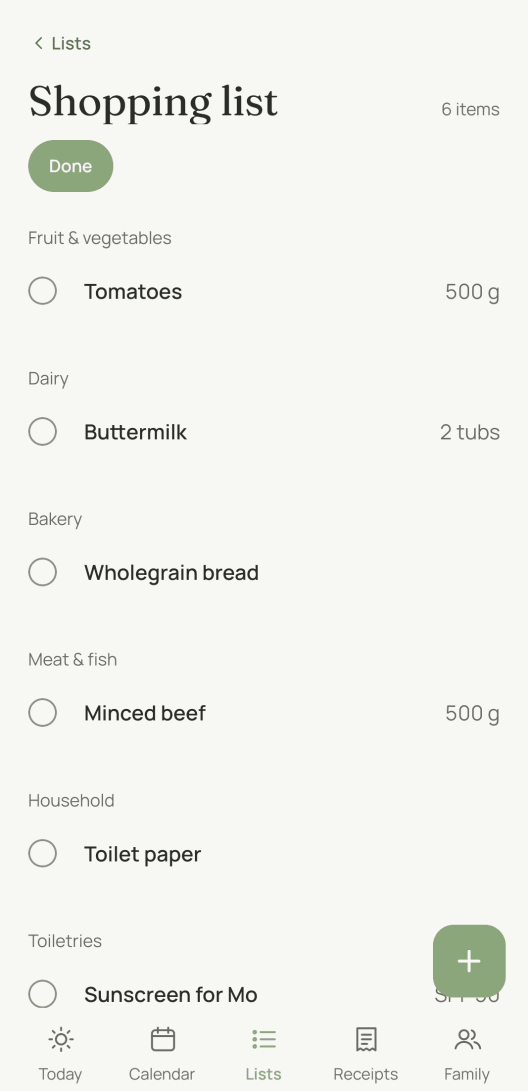
Whatever you have just ticked off stays visible under “In the basket” instead of disappearing. That is the difference between a list that tidies itself up and one you can shop with. At the till you want to see what is in the trolley.
Does moj remember what you always buy?
Yes, and without any AI. Things you buy regularly have a rhythm, and moj reads it from “Recently bought”. Three conditions have to be met:
- at least three purchases in the last three months
- the usual gap between them has passed since the last purchase
- nothing like it is currently open on the list
The item then appears under “Again?” and waits for you to tap it.
It is calculated, not guessed, and it stays a suggestion. Nothing goes onto the list by itself. Anything that must never run out belongs somewhere else anyway: on the pantry list.
Can the shopping list come from a recipe?
Yes. Send the link to a recipe page, and moj files the recipe with its list of ingredients. If you put “This one on Friday” in front of it, it goes into the plan for Friday. From there it is one step to the shopping list.
In that step only what is not on the list yet goes across. Anything already on it is left unticked when you move the ingredients over. And before that you untick the tin of tomatoes you know is in the cupboard. Buying the same thing twice is the most common mistake when cooking to a plan.
What can’t the shopping list do?
No prices and no offers. moj does not know what something costs, which shop stocks it or where it is cheaper right now. For that the list would have to know where you shop. That is information we do not give away.
No delivery and no basket. The list gets you to the shop. It does not order for you. We have not connected it to any retailer, in either direction.
No import from another app. You cannot bring in an existing list. You can leave at any time, though: the settings have an export of the whole family’s data.
No WhatsApp group. Each member writes to the moj number on their own. A group where software reads along is not the same as a chat where you tell it something.
As of 12 October 2026. In the Swiss App Store since 6 October 2026. Germany and Austria will follow, and Android by the end of the year.
Short answers
Is there a free digital shopping list?
Yes. The shopping list in moj is free, with all members and all lists. Without paying, you get 30 messages a month that moj sorts by itself. More than that takes moj Plus, at €4.99 a month for the whole family space. moj shows no advertising in any version.
Which shopping list app has no adverts?
moj has none. These pages load nothing from anybody else’s servers, and the app shows neither adverts nor recommendations from retailers. What you go without in return is set out further up under “What can’t the shopping list do?”.
Where can I make a shopping list on my phone?
In moj, once you have a family space. The list is under “Lists” and on every device in the family. If you are not in the app at the moment, send the item on WhatsApp, and it will be waiting in the app.
Can several people use the same list?
Yes, that is how it is meant to work. Everyone in a household sees the same list, and anything one person ticks off is ticked off for everyone. A second household in the same family space has its own. An invitation is all it takes. Nobody needs a second account with the same provider.
Can a family have several shopping lists?
Yes. Every household has exactly one shopping list, and “on the list” always goes to your own household’s. You can also create more lists, such as one for the chemist. Only items that name such a list go onto it.
Do I need WhatsApp to put something on the list?
No. WhatsApp is the fast way in, not the only one. In the app you type straight into the list, and both end up in the same place.
Is the shopping list available on paper too?
Yes, as a printable template, with the same eleven areas in the same order. It is free and needs no sign-up.
As of 12 October 2026. The same list on paper is the printable shopping list, one of the templates. How a message becomes an entry is on WhatsApp shopping list. And the calendar that goes with it is the family calendar app.
Would you rather just send your shopping list?
moj is the family planner you simply send things to: by WhatsApp, as a voice message or as a photo. It all ends up sorted, where everyone can see it.
In the Swiss App Store since 6 October 2026. Germany and Austria will follow, and Android by the end of the year.
Not available for you yet? Leave your address and we will let you know.
One mail to confirm, one at launch, none after that.