How does something get into moj?
You send it the way you would say it: typed, spoken or as a photo. There are four ways to send it. You write to the moj number on WhatsApp, or you use the inbox in the app, the button at the bottom right. You share something from another app. Or you forward a bill by email. If you would rather enter things yourself, you type them straight into the app.
What comes back is a single line: a tick and what was filed. moj does not start a conversation. If something is wrong, reply “undo” and the entry disappears.
Examples of the sentences moj understands are on what you can send. What WhatsApp can and cannot do as a way in is explained on WhatsApp shopping list.
What does moj make of it?
It turns it into one of seven kinds of entry. One sentence can also produce several: “Buy milk and dentist on Thursday” becomes two entries, not one.
- Shopping. Every item goes into its area, in the order a supermarket is laid out. The quantity is kept apart from the item. “500 g minced beef” becomes the item minced beef with the quantity 500 g. You never get an item called “500 g minced beef”.
- Task. With the person responsible and a date. Several people can share a task (“Tidy the garage, Ada and Ben”), or take it in turns: “Ada and Ben taking turns”. A task can repeat in two ways. “Every Monday” is a fixed rhythm. “Every two weeks after ticking it off” counts from the day the task was last done.
- Appointment. With the day, the time and the people involved. A place, an end time or several days in a row are added as soon as you mention them. “Swimming every Monday” becomes a series instead of a single appointment. A series can rotate between people too. Each appointment in it then shows only who is driving that time. An appointment can also block nothing. Working from home on Friday then appears in the calendar without setting off a warning. moj never invents a time you did not give. It asks.
- Receipt. moj reads the merchant, amount, date and due date from a photo of a bill. If the bill is still unpaid, it adds a task to pay it.
- Idea. A gift idea is filed with the person it is meant for. That person cannot see it. There are also ideas for trips, for the home and for recipes.
- Note. Anything worth keeping that is not a task: the paediatrician’s number, the meter reading, what the teacher said.
- Goal. Something that takes longer than a task and is made up of several entries. It has either separate steps or a sum you are working towards.
Timetable. Send a photo of your child’s school timetable. moj keeps the subjects and the times with the child. If one of the child’s appointments then falls in a lesson, moj says so in its reply. To “What does Mo have tomorrow?” it answers with the subjects. The timetable does not apply in the school holidays or on public holidays. After the summer holidays moj stops using the old timetable until you send the new one.
Duty roster. Send a photo or a screenshot of your duty roster. moj files each shift as an appointment. It knows the time of a code like “B8” from the shifts already in your calendar. If the roster prints the time itself, the roster’s time counts. If moj does not know a code yet, it asks once. An answer like “TO 7 to 15:30, U all day, X off” is enough. With the next roster moj knows it already. If you send a changed roster, moj cancels the shifts on its days that no longer match. A dentist appointment on a day off stays.
Where does the family find it again?
It is all in five views, and none of them makes you search. If you do want to find something specific, every view has a magnifying glass at the top. It searches every kind of entry at once.
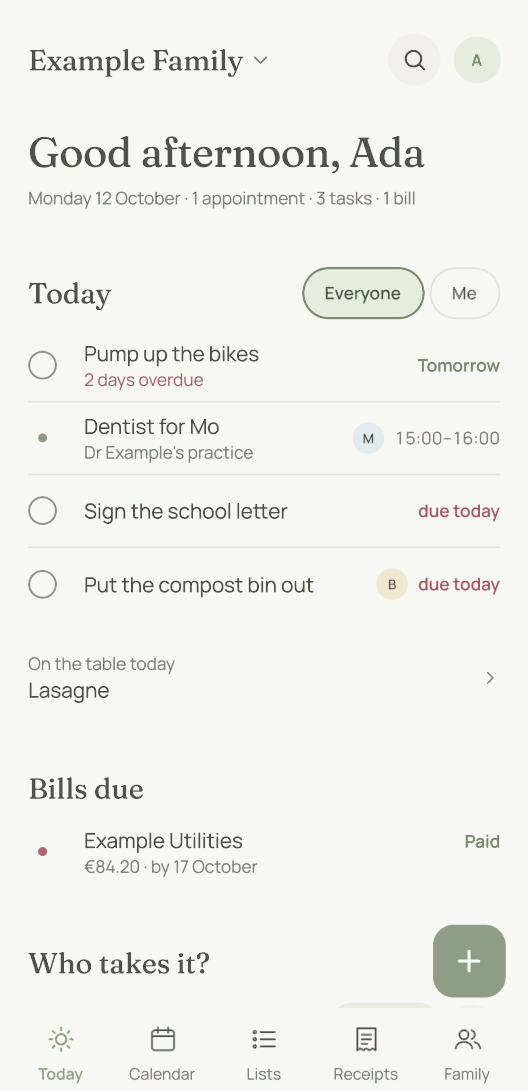
- Today. The start screen shows what is on today. At the very top is anything moj still needs you to confirm. With a timetable it also says until when there is school. In the evening it shows tomorrow’s subjects.
- Calendar. It shows appointments, birthdays and due dates, colour-coded and with a column for each person. Public and school holidays appear beside them in grey once you have chosen your country and state. A household in another state sets its own. moj can also subscribe to an outside calendar, such as the nursery’s.
- Lists. This is where the shopping, tasks, meal plan, ideas, notes and your shared goals live. You can also create lists of your own, for shopping or as a checklist for films or packing.
- Receipts. This is where moj collects the bills you photograph, with amount and due date.
- Family. This holds the people, with their birthdays, sizes and gift ideas. Anyone entered as “A child of ours” also has their timetable there. The child needs no account of their own for it. You can change the timetable there by hand. If a child does not go to school, you can hide the timetable. moj then does not mention school holidays at their appointments either. Your households are here too: one from the start, and a second once you live across two homes.
There is also your phone’s home screen, on iPhone and on Android. A moj widget there shows a list you tick off with one tap. You do not have to open the app for it. Another widget shows the next twelve hours of appointments as arcs on a clock face.
The way in and every area with more to say have a page of their own:
- WhatsApp shopping listIn WhatsApp a list is just text in a chat. moj turns it into entries that everyone sees.
- Family calendar appYou send an appointment instead of typing it. moj knows who it belongs to.
- Shopping list appEveryone sees the same list, sorted by the areas of a supermarket.
- Meal planning appYou send a recipe link and put it on a day. From there the ingredients go onto the shopping list.
- Chore appTasks rotate between you. And a task is due again only once enough time has passed since it was last ticked off.
- ReceiptsA photo gives you the merchant, amount, due date and warranty, plus a task to pay it.
- Birthday reminder appmoj reminds you 21, 7 and 1 day before the birthday and says how many gift ideas you already have.
What do the others in the family see?
They see everything you share, and nothing more. It all lives in your family space, which has nothing public in it and no strangers. Only the people you invited are there.
A child’s account sees the lists, tasks and calendar, but no receipts and no settings. With the role “Caregiver”, Grandma or the babysitter see the same and can add things for everyone. And a gift idea stays hidden from exactly the person it is meant for.
You can still keep something to yourself. When you create an entry, there is a line “Who sees this” with the button “Only me”. Whatever you create that way stays with you. The same line lets you share an entry or a list with just the people you pick.
The full rules are on Who sees what. What is sent to the AI model along the way is on AI and your data.
What can’t moj do?
We did not build a chatbot. moj does not make small talk or answer general knowledge questions. It does answer questions about your own entries.
No budgeting and no recipe site. moj files receipts and finds them again. It keeps no budget. It saves recipes as a link with their ingredients and has written none of its own.
We did not build an import from other apps. You can leave at any time, though. The settings let you download everything as a file.
The full list is on What moj cannot do, with the reason for each limit.
Short answers
What can moj do?
moj takes whatever comes up in a family and files it where it belongs. That covers the shopping list, tasks, appointments, receipts, the meal plan, ideas and notes, people with their birthdays and gift ideas, and goals you work towards over a longer time. You can type it, say it or send a photo. It goes in through WhatsApp or the app.
Is moj a calendar or a shopping list?
Both, and that is the reason moj exists. “Dentist on Thursday, and please pick up some milk” is one sentence, the way people actually say it. Two separate apps would need two entries for it. moj turns it into an appointment and a line on the shopping list.
Do I have to do something different for each kind of entry?
No. There is one way in for everything. You send a sentence, a photo or a voice message, and moj works out what it is. If it is unsure, it asks one short question. You never get a form.
Can I use moj without the app?
For sending, WhatsApp is enough. You write to the moj number, and a line comes back with what was filed. To look things up without the app, you have two options. The first is the kitchen display: a page for a tablet in the kitchen that shows today, the next few days and the shopping list. The second is a calendar subscription. That is a link that lets Apple Calendar or Google Calendar show your appointments. Both are for viewing only. You cannot change anything there.
As of 14 October 2026. How to begin is explained under Getting started. The rest of the help is under Help. The printable templates need neither the app nor a sign-up.
What will you send moj first?
moj is the family planner you simply send things to: by WhatsApp, as a voice message or as a photo. It all ends up sorted, where everyone can see it.
In the Swiss App Store since 6 October 2026. Germany and Austria will follow, and Android by the end of the year.
Not available for you yet? Leave your address and we will let you know.
One mail to confirm, one at launch, none after that.