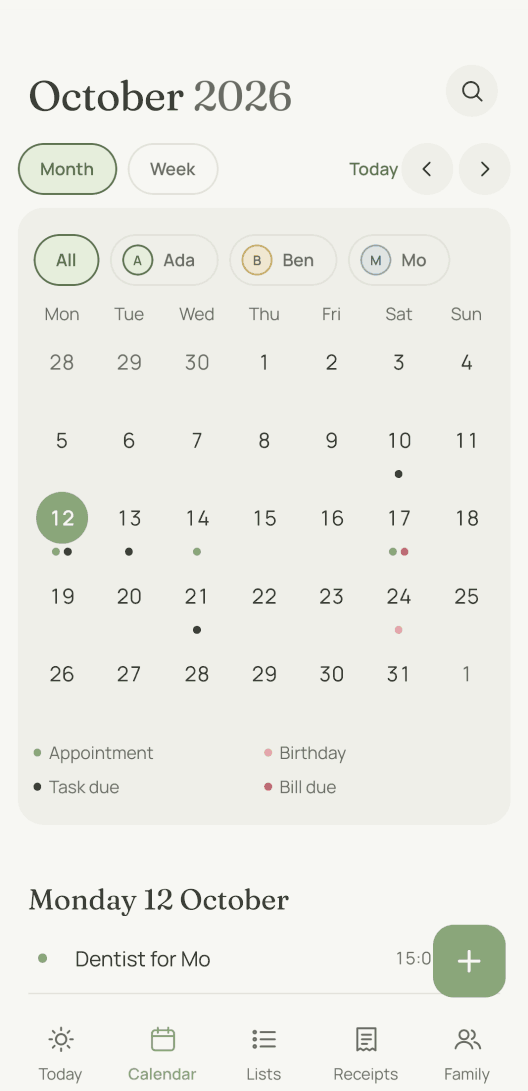
How does an appointment get into the calendar?
You send it: “Dentist for Mo on Thursday at 3 pm” on WhatsApp, as a voice message or as a photo of the letter from school. moj turns it into an appointment, with the day, the time and the person you named.
A line comes back with the appointment, the day and the time. If something is wrong, reply “undo” and the appointment disappears.
Dentist for Mo on Thursday at 3 pm7:58
Appointment: Dentist for Mo, Thursday 15 October, 15:00Reply with “undo” to take that back.
If you prefer typing, you can type it in the app. Either way it goes into the same calendar and shows for everyone.
Anything else you mention is kept: a place, an end time, several days in a row. “Swimming every Monday” becomes a series, and so does “every other week from Friday to Sunday”. And an appointment does not have to block time. Working from home on Friday appears in the calendar without moj treating the time as taken.
Who does an appointment belong to?
It belongs to the people taking part. An appointment goes in the column of each person involved. A task goes with the person responsible for it. Anything that names nobody goes under “All”: the bill, the bins, Grandma Ilse’s birthday.
The week view is laid out the same way. The days are rows, every person has a column, and “All” is on the far left.
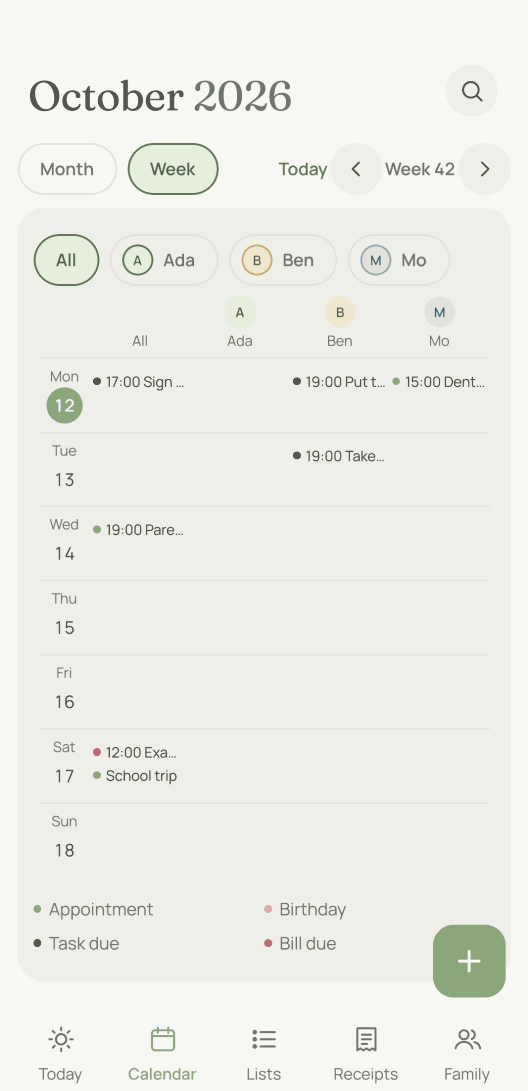
Above both views is the same row of names. Tap one, and only that person’s calendar remains. You see a child’s day without having to filter out everyone else in your head.
The clash warning follows the same rule. If you add an appointment at a time when that person already has something on, moj tells you. It does the same when a child has an appointment while every adult is busy. moj does not guess here. It works it out. The warning comes as one line when the entry is filed, while there is still time to act on it. The same line also tells you if the day is a public holiday or falls in the school holidays.
What else is in the calendar besides appointments?
There are three more kinds of entry, each with its own coloured dot: birthdays, tasks due and bills due.
A bill that arrived as a photo appears on its due date. A task that repeats “every Monday” or “seven days after ticking it off” appears on the day it is next due. Birthdays come from the people in your family and, if you want, from your phone’s address book.
Public and school holidays are there too. They show in grey once you have chosen your country and state in the settings under “Holidays and school breaks”. moj knows both for Germany, Austria and Luxembourg. For Switzerland, Ireland and the United Kingdom it knows only the public holidays. If a household lives in another state, you set that on the household’s page. Everyone then sees the school holidays of their own state.
A recurring appointment can skip the school holidays. Every series has a switch for this. For an appointment called School, it is on from the start. moj keeps nursery and after-school club running through the holidays, because they are usually open then.
No phone buzzes at night. moj gathers whatever falls due between 21:00 and 07:00 and sends it as one message in the morning.
Can you tell appointments apart by colour?
Yes, with your own categories. You create them yourselves and give each one a colour. Work, school or training are typical ones. The dot in the month view then takes on that colour.
You can also just say the category as you send something. “Work: early shift on Tuesday” gets the category, and the title still says only early shift. The label belongs to the appointment, not in its name.
Can I see the calendar in Apple Calendar or Google Calendar too?
Yes, through a subscription. Each adult in your family has their own calendar address, and Apple Calendar or Google Calendar can subscribe to it. Your appointments then appear there with birthdays and due dates, from about 6 months back to 18 months ahead.
Your categories are included, so the other calendar can colour them itself. Your region’s public and school holidays come through as all-day events and take up no time there.
You create your address in the settings under “Shares”, with “Create calendar address”. “Copy address” lets you paste it into the other calendar. It shows what your household sees, plus everything meant for everyone. The other adults each have their own address.
The address needs no password. Anyone who has it can see your appointments. Treat it like a password yourselves and do not pass it on.
How quickly the other calendar catches up is up to that calendar. Calendar on the Mac has a menu for it (“Auto-refresh”). Google gives no interval for subscribed addresses. Expect hours rather than seconds. To see what was just added, look in moj. Checked on 7 October 2026.
The other calendar only reads your appointments. You can only change them in moj. So each appointment has exactly one version, and it lives in moj.
Does moj also take appointments from other calendars?
Yes, also through a subscription. Many nurseries, schools and clubs publish their dates as an address in iCal format. You add it in the settings under “Calendars from outside” and choose who goes to these appointments. moj then fetches them every hour and files them under the people you chose.
Your own calendar has an address like this too. Google calls it “Secret address in iCal format” and shows it in the settings of each individual calendar. Outlook on the web provides it as an ICS link under “Publish a calendar”. On the iPhone you turn on “Public Calendar” for the iCloud calendar and copy the link with “Share Link”. Checked on 7 October 2026.
If you add such an address to moj, its appointments appear in your family’s shared calendar. That is why a work calendar can be set to “Busy only”. Each appointment then takes the calendar’s name, such as “Work”. moj does not even store the title or place. An appointment marked private in the file shows only as busy anyway.
Only the person who added the calendar sees its address and its switches. If you live across two households, its appointments appear only in yours, unless one of them names someone from the other.
Whether moj reminds you of these appointments is a setting on that calendar. If your own calendar already reminds you, choose “No” there.
In moj it is then an ordinary appointment, and you can change it. But your change does not go back to the source. If the source itself changes something, moj picks up exactly that change at the next fetch. If you remove a subscription, its future appointments disappear from moj. Past ones stay.
What is the kitchen display?
It is a page for a tablet in the kitchen. It shows today, the next few days and the shopping list, and nobody has to sign in on that device. If a child has a timetable, each school day shows when school ends and the subjects. A child without a phone of its own sees in the kitchen what goes in the bag tomorrow. Nothing can be changed there. We built it that way on purpose, because everyone who walks past ends up in front of that screen.
What can’t the family calendar do?
No syncing in both directions. Your appointments go out as a subscription, and outside appointments come in as one. A change never goes back to the source. Otherwise every change would exist twice in two calendars, and nobody would know which version counts.
No invitations to outsiders. The calendar belongs to your family. Anyone who should be part of it gets an invitation. We did not build guests for a single appointment, and no WhatsApp group either.
As of 12 October 2026. In the Swiss App Store since 6 October 2026. Germany and Austria will follow, and Android by the end of the year.
Short answers
Is moj a shared calendar for the whole family?
Yes. Everyone in a family space sees the same calendar, each on their own device. An appointment that names a person appears with that person. One that names nobody appears for everyone.
Do I have to type in appointments?
No. You send them, and moj creates them. You can send them on WhatsApp, as a voice message or as a photo of the letter from school. You can still type them into the app if you prefer.
Can I see the calendar in Apple Calendar or Google Calendar?
Yes, through a subscription. moj gives every adult their own calendar address, and both apps can subscribe to it. How often they check it is up to them. Apple has its own menu for it, and Google gives no interval for subscribed addresses. Expect it to take hours before a new appointment shows up there. You can only change an appointment in moj.
Does moj also take appointments from other calendars?
Yes. If a calendar has an address in iCal format, add it in the settings under “Calendars from outside”. That works for the nursery’s or the club’s calendar, and for your own at Google, Outlook or Apple. moj then fetches the appointments every hour. For a work calendar you choose “Busy only”. moj then shows the time but not the title. If you change one of these appointments in moj, the change does not go back to the source.
Does moj warn me when two appointments overlap?
Yes, in two cases. In the first, the person already has something on at the same time. In the second, a child has an appointment while every adult is busy. moj does not guess at this. It works it out, and the warning comes as one line when the entry is filed. The same line also tells you if the day is a public holiday or falls in the school holidays. If you are in two family spaces, your phone also checks your own appointments in both against each other. This only covers appointments with a time that you yourself are part of.
Can moj do recurring appointments?
Yes. “Swimming every Monday” becomes a series, and so does “every other week from Friday to Sunday”. In the app you set the rhythm in the appointment itself: daily, weekly, every 2 weeks, every 4 weeks, monthly or yearly. If you change it later, moj asks when you save: “Only this one” or “All future ones”.
Can an appointment be in the calendar without blocking the time?
Yes. Working from home, being on call or “the children are with me” describe a day, not a commitment. Add “just FYI”, or set the chip “Blocks nothing” in the app. The appointment then shows in the calendar without setting off a clash warning. In the subscription it is marked as free time too.
Where does the calendar get the birthdays from?
From the people in your family, and from your phone’s address book if you want. There you see only contacts with a birthday, and you choose which of them to add. For those you pick, only the name and the day are uploaded.
What is the kitchen display?
A page for a tablet in the kitchen. It shows today, the next few days and the shopping list. If a child has a timetable, each school day shows when school ends and the subjects. Nothing can be changed there. We built it that way on purpose, because everyone who walks past ends up in front of that screen.
As of 12 October 2026. The same layout exists on paper as the printable weekly planner, one of the templates. How a message turns into an appointment is explained on WhatsApp shopping list.
Would you like your family calendar to fill itself in?
moj is the family planner you simply send things to: by WhatsApp, as a voice message or as a photo. It all ends up sorted, where everyone can see it.
In the Swiss App Store since 6 October 2026. Germany and Austria will follow, and Android by the end of the year.
Not available for you yet? Leave your address and we will let you know.
One mail to confirm, one at launch, none after that.