How does a photo become a receipt?
You photograph the bill and send it, on WhatsApp or through the inbox in the app, the button at the bottom right. If you share a picture from another app, moj starts reading straight away and asks you nothing more. There is nothing to add to a till receipt anyway.
Bill: Example Utilities €84.20, due 17 OctReply with “undo” to take that back.
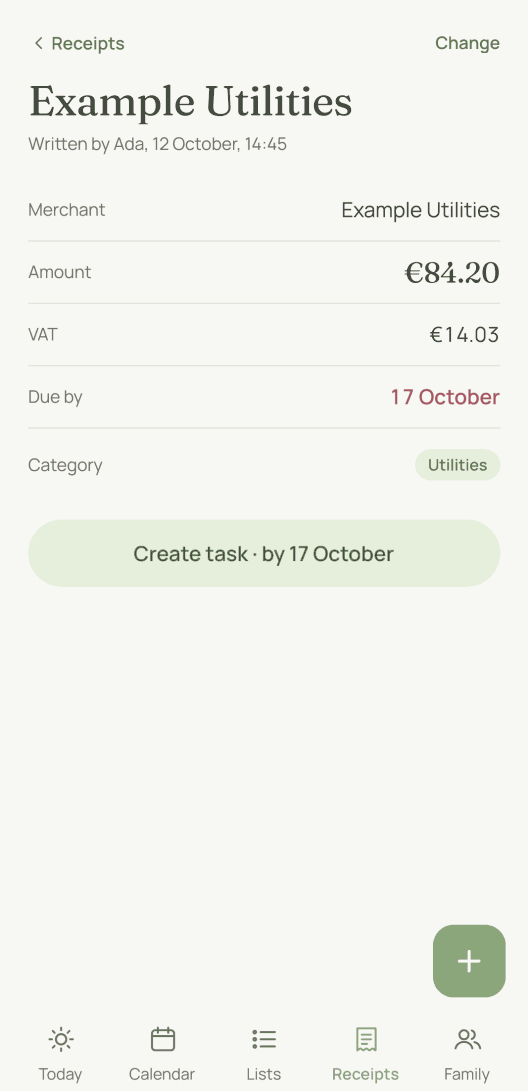
It becomes a receipt with these details from the bill:
- Merchant, date and amount, plus the VAT if it is shown.
- The due date, if a payment deadline is printed.
- The warranty, if a period is stated: “2 years’ warranty” becomes a date you will still find in two years.
- IBAN and payment reference, if the bill names them.
- The line items, as printed, and one category out of thirteen.
moj accepts photos, PDFs and text up to 20 MB. If it cannot read something, it tells you straight away. Nothing disappears without a word.
If moj misread something, you correct it with a sentence or directly on the receipt. The receipt also shows where it came from: “Photo from Ada, yesterday”.
Typing works too. “Example Utilities 84.20 due on the 30th” becomes the same receipt, just without a picture behind it.
How does moj know what is still to be paid?
It knows from the bill itself. If the bill has a payment deadline and is still unpaid, moj creates a “Pay” task at the same time as the receipt. The task is due on that day and linked to the receipt. A till receipt gets no such task. It is already paid, or you would still be in the shop.
This link is what matters. Tick off the task, and the bill counts as paid. Mark the bill as paid, and the task is done. Otherwise two lists that mean the same thing drift apart, and someone ends up paying twice.
If the task is missing because the deadline turned up later, you add it on the receipt with one tap.
If the deadline moves, you change “Due by” on the receipt. The “Pay” task moves with it, and so do the reminders. Nothing changes at the company’s end.
Your phone alerts you three days before the deadline, and again on the due date. moj does that only for bills. A task reminds you only if someone has set a reminder for it, because a due date is an intention. A forgotten bill costs money.
What is due when also appears in the family calendar, with its own dot beside appointments and birthdays. It is in your morning overview as well.
How do you pay a bill from here?
You pay it in your banking app, and moj just saves you the typing. If a bill in euros has an IBAN, moj draws a Girocode. That is the EPC QR code for bank transfers in the euro area. If your banking app can scan it, the amount, recipient and payment reference are filled in for you.
We made two choices here on purpose. First, moj checks the IBAN before it draws any code at all. A digit misread from a photo would produce a code that sends money to the wrong place. No code is better than a wrong one.
Second, you send the transfer yourself in the banking app, after seeing the IBAN and the amount there. moj has no access to your account and does not want any.
How do you find a receipt again a year later?
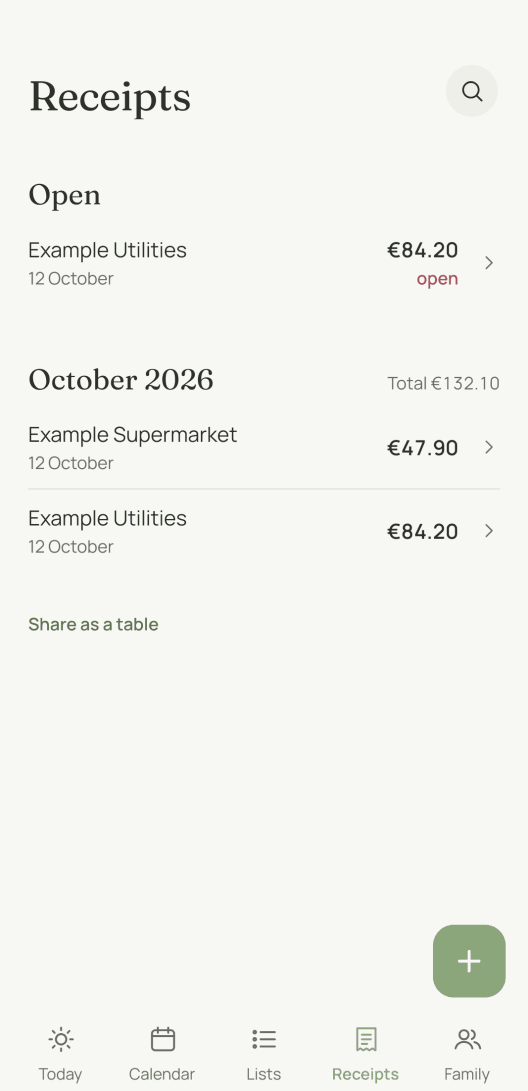
The list is ordered by month, and each month shows its total. A receipt in another currency is listed, but its amount does not count towards the total. The latest month is at the top. Each receipt shows the merchant and amount, plus the due date while the bill is unpaid.
If you remember the merchant, tap the magnifying glass at the top. It searches your receipts for the name, and everything else in your family space too.
Asking is quicker. moj answers “What did we spend at the chemist in September?” from your recent receipts. It does not search the whole archive for this.
Taking a photo pays off most with warranties. If you sent in the receipt for the washing machine, you won’t have to hunt for it in a folder three years later.
For this the receipt has “Remind me before it ends”. One tap creates a task one month before the warranty runs out. It then appears in the calendar while there is still time to act.
For tax or insurance, you can have the receipts as a table. Below the list is “Share as a table”, which gives you a CSV file with one row per receipt.
Where are the photos kept?
They are kept in private storage in the EU. Anyone viewing a picture gets an address for it that expires after a short time. A link someone passes on leads nowhere later.
Within the family the adults see the receipts. A child’s account does not. And if you live across several households, a receipt belongs to the household that sent it. Add a person if another household should see it: “for Mo” under the photo sends the receipt to wherever Mo lives.
One word of a name is enough if only one person has it. “For Nana” finds “Nana Gerda”, and “for Lina’s jacket” finds Lina too. If there are two nanas, add the name. If the whole family space should see the receipt, add “for everyone”. You can also do this afterwards with “Change” and “Everyone” under “Who sees this”.
The full rules are on Who sees what. What is sent to the AI when moj reads a bill is on AI and your data.
What can’t receipts do?
No household budget. We have not built budgets, monthly targets or totals per category. The only thing the list adds up is the month. The total counts only the receipts you can see.
No cashback and no points. Your receipts do not turn into money, because they are not sold anywhere.
No transfers. moj draws the code, and your banking app makes the payment.
The export does not include the pictures. It gives you every receipt with all its details as a file and names the photos that go with it. It does not bundle them.
As of 12 October 2026. In the Swiss App Store since 6 October 2026. Germany and Austria will follow, and Android by the end of the year.
Short answers
Can moj scan till receipts?
Yes. You send the photo or the PDF, and moj reads what is on it. That means the merchant, date, amount, VAT and the individual line items, plus the IBAN if it is printed. A bill with a payment deadline also becomes a task to pay it.
Can you earn money with receipts?
Not with moj. We have not built in cashback or points. We do not sell your shopping data either, to retailers or to market researchers. So we have no reason at all to collect your receipts. moj keeps them for you and nobody else.
Is moj a household budget app?
No. moj files receipts and finds them again, with merchant, amount, date and due date. Each month shows its total. moj keeps no budget. It does not add anything up by category either, and it does not tell you how to live.
Does moj pay the bill?
No, and it is not meant to. For a bill with an IBAN, moj shows a Girocode. Your banking app scans it and fills in the transfer from it. You send the transfer yourself, after checking the IBAN and the amount. moj has no access to your bank.
Do the children see the bills?
No. A child’s account sees the lists, the tasks and the calendar, but no receipts. That applies in the app and on WhatsApp: moj accepts no photos or documents at all from a child.
As of 12 October 2026. What else a message can turn into is on what you can send. Everything moj does is under Features.
What if the next bill were just a photo?
moj is the family planner you simply send things to: by WhatsApp, as a voice message or as a photo. It all ends up sorted, where everyone can see it.
In the Swiss App Store since 6 October 2026. Germany and Austria will follow, and Android by the end of the year.
Not available for you yet? Leave your address and we will let you know.
One mail to confirm, one at launch, none after that.