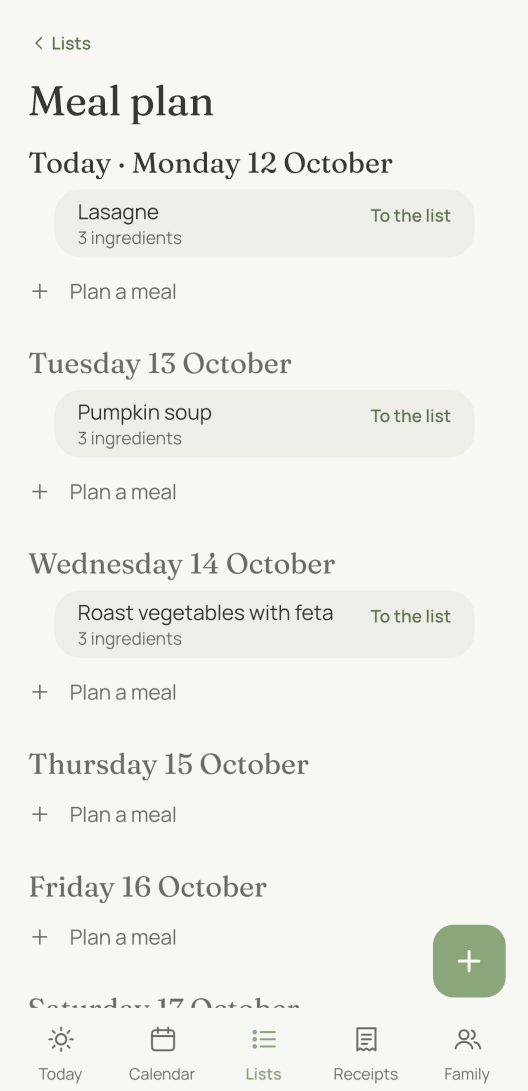
How does a recipe get into the plan?
You send the link: “This one on Friday” and the address of a recipe page, on WhatsApp or in the app. moj creates the recipe and puts it straight onto Friday. If you leave out the day, it waits among the ideas without a day.
moj fetches the ingredients from the recipe page itself, as long as the page provides them in machine-readable form. That takes no AI, just reading. moj looks in the page’s source code for the list of ingredients it includes for machines.
If it finds none, you get the page as an idea with its title and link, and you add the ingredients yourself. Typing always works too. “Lasagne on Friday” is enough if the recipe is in your head.
Where do the recipes you collect live?
They live with the ideas, along with their ingredients and their link. In moj a recipe is not a separate kind of entry. It is an idea with ingredients.
This gives you one place for “what we could cook some time” and one for “what we are cooking on Thursday”. We did not want to give you two lists you constantly have to keep in step.
Anything without a day appears under “Ideas without a day”. That is the pool you plan from. A recipe stays there even once it has a day, because it carries a whole list of days. Tuesday’s lasagne can go on next week’s plan as well, without anyone creating it a second time.
How far ahead does the plan reach?
It covers seven days, starting today. Each day gets a row, with what is planned for it underneath.
Empty days stay visible. A plan with gaps answers the very question it exists for: what is still missing?
You shop by the week. That is why the plan opens on a week.
To plan further ahead, tap “One more week” at the bottom. You can add up to four weeks this way. Holidays or visitors are when one week is too short.
What goes onto the shopping list?
Only what is missing from it goes across. “To the list” shows the recipe’s ingredients with ticks, and anything already open on your list is unticked. Beforehand you untick the tin of tomatoes you know is in the cupboard.
moj compares generously on purpose. “2 onions” and “onions” count as the same thing. Nobody trusts a list with both on it.
“500 g minced beef” becomes the item minced beef with the quantity 500 g beside it. It goes under Meat & fish rather than “Other”, so it follows the same order as the rest of the shopping list.
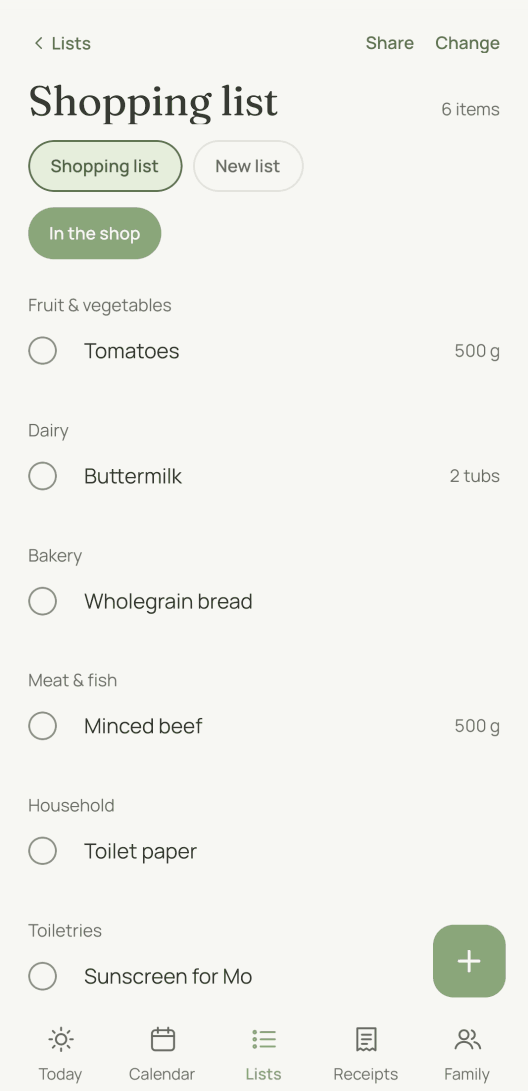
The whole step counts as one action. A single “undo” takes back every line it created, not just the last one.
What can’t meal planning do?
No nutritional values and no advice. moj plans meals, not nutrition. It counts no calories, knows no diets and does not tell you what is healthy. We have no basis for that, and here a guess would be worse than nothing.
No recipes of its own. moj is not a recipe site. It comes with no collection, suggests nothing and does not guide you through the cooking.
No scaling by servings. The ingredients go on the list exactly as the recipe gives them. If you cook for six instead of four, you do the maths.
No delivery. The list gets you to the shop. We have not connected it to any retailer, in either direction.
As of 12 October 2026. In the Swiss App Store since 6 October 2026. Germany and Austria will follow, and Android by the end of the year.
Short answers
How can I make a meal plan for free?
In moj, once you have a family space. Send or type in a recipe, put it on a day, and your plan is ready. The meal plan is part of what moj offers for free, and it shows no advertising.
Does moj offer a nutrition plan?
No. moj plans meals, not nutrition. It shows no nutritional values, counts no calories and does not tell you what to eat. You decide what goes on the plan.
Does moj come with recipes of its own?
No, and we left it that way on purpose. Your recipes come from the sites you read anyway, or from your head. moj is not a recipe site. It plans your meals and writes the shopping list that goes with them.
Do I have to type out the ingredients?
Usually not. If the recipe page provides its list of ingredients in machine-readable form, moj reads it and files it with the recipe. If not, you get the page as an idea with its title and link. You then add the ingredients yourself.
What happens to ingredients that are already on the shopping list?
They are not added twice. When you move the ingredients across, anything already open on the list is left unticked. “2 onions” counts as the same as “onions”. Buying the same thing twice is the most common mistake when cooking to a plan.
Can the same recipe be on the plan more than once?
Yes. A recipe carries a whole list of days. Tuesday’s lasagne stays where it is and can go on next week’s plan as well, without being created again.
Does the whole family see the plan?
Yes, everyone in the family space sees the same meal plan. The ingredients go onto the shopping list of the person who moves them across. In a family with two households, that is their own household’s list.
As of 12 October 2026. The ingredients go to the shopping list app. What else is happening that week is in the family calendar. And on paper there is the weekly planner, one of the templates.
Would you like next week’s meals sorted already?
moj is the family planner you simply send things to: by WhatsApp, as a voice message or as a photo. It all ends up sorted, where everyone can see it.
In the Swiss App Store since 6 October 2026. Germany and Austria will follow, and Android by the end of the year.
Not available for you yet? Leave your address and we will let you know.
One mail to confirm, one at launch, none after that.