How does a task get onto the list?
You send it: “Ben should take the bins out by Friday” on WhatsApp, spoken or in the app. moj turns it into a task, with the person responsible and the day it is due.
A single line comes back. If something is wrong, reply “undo” and the task disappears.
Ben should take the bins out by Friday18:05
Task: Take the bins outReply with “undo” to take that back.
If your sentence has no day in it, the task still counts. It goes under “No date” and never becomes urgent by itself. Other sentences moj understands are on what you can send.
What does a cleaning rota do differently in moj?
It knows two kinds of repetition, and the difference between them is the whole point. A chart you fill in knows only the first.
Fixed rhythm. “Take the bins out every Monday.” It comes back on schedule, no matter when it was done. That suits everything tied to a day: bins, a class, parents’ evening.
After completion. “Change the beds every two weeks after ticking it off.” It comes back only after someone has ticked it off, and it counts from that day. That suits laundry, filters, plants and most of the real cleaning. A week’s holiday only throws a cleaning rota off when it is tied to the calendar rather than to the last time the job was done.
You can say either kind straight away. The repeating task then shows three lines: the rhythm, the next date and the day someone last ticked it off. Those are exactly the three you would keep up to date on paper, and mostly don’t.
In the app you can set a fixed rhythm without a sentence too. When you create a task, it has the line “Repeat”: daily, weekly, every 2 weeks, every 4 weeks, monthly or yearly. That turns it into a rule instead of a one-off task.
On paper the same idea is the cleaning schedule template, which is sorted by interval instead of by weekday.
Whose turn is it when everyone takes turns?
It is the next person on the rota, and moj moves the turn on by itself.
For a recurring task, “Who” can be nobody, a fixed person or “Taking turns”. Taking turns needs at least two people, and you set the order yourselves. Ticking the task off passes it on to the next person. The list then says “taking turns” instead of a name.
If a round is skipped, for example with “No bathroom cleaning this Saturday”, the same person is up next time. The reply names the Saturday being skipped.
If a round is left undone, a fixed rhythm does not wait for it. On the next date the next round comes, with the next person. The undone round stays overdue with its person. If that person leaves the family, moj asks “Who takes it?”. A task “after completion”, on the other hand, only comes back once it is ticked off.
This is exactly where a plan on paper or in a spreadsheet gives up. It does not know who went last, so someone has to remember. Turns that move on when a task is ticked off need nobody to keep track in their head.
You can set up the rota with a sentence too. “Take the bins out, me and Ben taking turns” puts you both on the rota. If you live across several households, everyone on the rota sees the task. A second sentence with two or more names rewrites the rota: “from now on Rita and me taking turns”. That also works for a task that had one fixed person until now. After that the turns move on by themselves.
If someone swaps just once, a sentence with one name is enough: “I’ll do the stairs on Saturday”. The rota stays as it is. In the app you open that one task and change “For whom”. Once it is ticked off, the next person on the rota is still up. For a real swap, you set the other person next time. If one person alone should do it from now on, change that under “Who”.
An appointment can rotate too: “Physio on Tuesdays, Rita, Rosa and me taking turns to drive”. Each Tuesday then shows only whose turn it is, and only that person gets a reminder. If a Tuesday is cancelled, the next one still goes to the next person. For an appointment, every date in the series counts as a turn.
What order is the task list in?
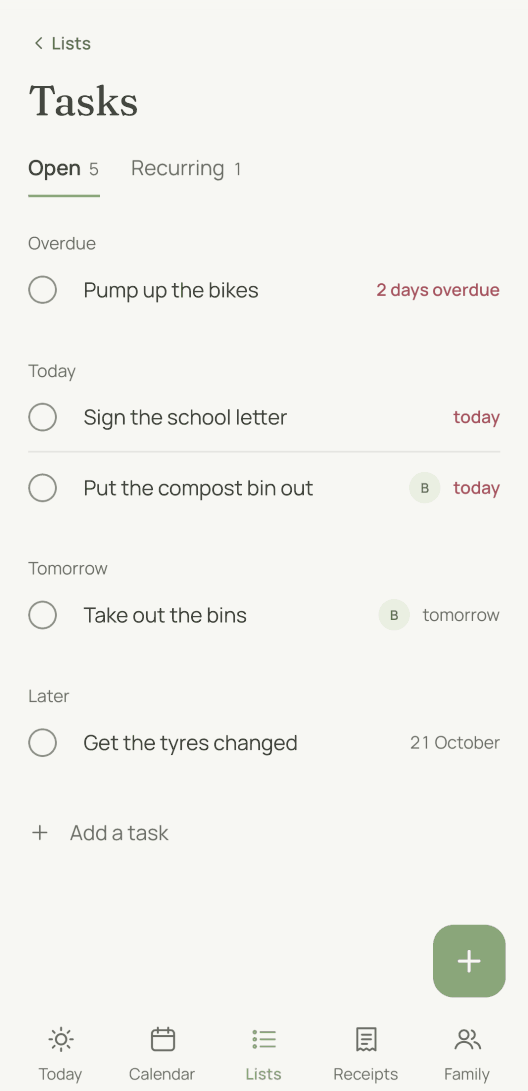
It follows what is due next. The list has six sections: overdue, today, tomorrow, this week, later, no date. Within each section the earliest comes first.
A ticked-off task disappears instead of staying there crossed out. Seeing it go is the feedback.
Beside it is a second view, “Recurring”. It shows every rule with its rhythm, whose turn it is and when it is next due. That is where you change, pause or delete a rule.
When you delete one, moj first tells you what goes with it. Its open tasks disappear, and anything already done stays.
Pausing instead of deleting is meant for the week you are on holiday. The rule keeps its rhythm and shows the word “paused” in the list. Its open tasks disappear for that time.
When you restart the rule, the rhythm counts from that day. With “after completion” it counts that way anyway. With a fixed rhythm, you would otherwise be stuck all week with an overdue task that nobody can do any more.
What is due today also appears on the app’s start screen, and as its own dot in the family calendar, among appointments and bills due.
Does moj remind you of a task?
It does, but only when someone asks for a reminder. A due date is an intention, not an alarm clock, so a task does not ring by itself. You set the reminder on the entry. Without one, the task shows up in the morning overview with the day’s appointments.
And no phone buzzes at night. Whatever falls due between 21:00 and 07:00 comes in the morning as one line instead of five during the night.
Can children take on tasks?
Yes, their own. A child’s account sees the lists, the tasks and the calendar. It can create and change only the tasks assigned to that child. It can also tick off a task that names the child as a second person.
On WhatsApp, moj accepts shopping, checklists and their own tasks from a child. Receipts, settings and other people’s rules stay off limits. The full rules are on Who sees what.
If you live across two households, a rule can belong to one of them. One home’s cleaning rota then does not show for people who don’t clean there.
What can’t the cleaning rota do?
No points, no stars, no rewards. Ticked off is ticked off. A household is not a game with a score, and we don’t want to turn it into one.
No tally of who did how much. We keep no statistics, and there is no monthly summary per person either. The list shows what is open.
No household budget. For many people, running a household means managing money. moj files receipts and finds them again. It keeps no budget.
No priorities. We sort by due date. You cannot mark a task as more important to move it to the top.
As of 20 October 2026. In the Swiss App Store since 6 October 2026. Germany and Austria will follow, and Android by the end of the year.
Short answers
Which chore app is the best?
That depends on where things go wrong in your home. Most are good charts to fill in. If someone in your house keeps the chart up to date, that is enough. moj is built for the other case. You say “Change the beds every two weeks after ticking it off, Ada and Ben taking turns”, and from then on nobody has to keep the plan up to date.
Is moj a free chore app?
Yes. Repeating tasks, assigning people and any number of members are free in moj. The only thing you pay for is moj Plus, and all it does is lift the limit of 30 messages a month. moj shows no advertising, and we do not sell your data.
How do I make a cleaning rota for the family?
You send the first task the way you would say it: “Take the bins out every Monday, Ben”. moj creates it with the person responsible and the rhythm, and every other task goes in the same way. If you would rather plan on paper, print the cleaning schedule template. It is sorted by interval in the same way.
Can the cleaning rota rotate between several people?
Yes. For a recurring task you set “Who” to “Taking turns” and choose at least two people. Ticking it off passes the task on to the next person. The list then shows “taking turns” for that rule.
Is this also a to-do list for the family?
Yes, it is the same list. Cleaning is just the kind of task that comes round most often. “Sign the letter from school by Friday” and “Change the tyres” appear in the same view, sorted by due date.
As of 20 October 2026. The same idea on paper is the cleaning schedule template, one of the printable templates. What else moj does is under Features.
Would you like someone else to keep track of whose turn it is?
moj is the family planner you simply send things to: by WhatsApp, as a voice message or as a photo. It all ends up sorted, where everyone can see it.
In the Swiss App Store since 6 October 2026. Germany and Austria will follow, and Android by the end of the year.
Not available for you yet? Leave your address and we will let you know.
One mail to confirm, one at launch, none after that.