Who owns what is in your family space?
What is in your family space belongs to the family. Anyone who sees a list sees everything on it. There are no half-secret lists.
Five things narrow that down: “Only me”, individual people, households, restricted accounts and gifts. Each one has its own section below.
What does “Only me” mean?
When you create something in the app, you see the line “Who sees this”. One of its buttons is “Only me”. If you choose it, nobody else sees the entry, and moj does not mention it to anyone either.
This works for appointments, tasks, ideas, notes, meals and goals. You can also add a person this way, birthday included.
It works by message too. Words like “just for me”, “private” or “nobody else should see this” make an entry “Only me”, along with your message about it.
If someone leaves the family, their “Only me” entries disappear with them. They belong to that person, not to the space. If you remove someone, the confirmation tells you this first.
How do you share an entry with individual people?
In the “Who sees this” line, the “More” button comes after “Only me”. It opens the households and everyone in the family who has their own account. If there are many, you can find them with the search.
If you tap people, only you and they see the entry. It no longer matters where they live. Your own household does not see it either. A sentence under the buttons says who can see it, such as “Only you and Ben see this.”
This works for appointments, tasks, ideas, notes, meals and goals. It also works for series and lists. Only the people you chose get a notification. They are also the only ones moj asks who will take an appointment.
If someone leaves the family, the others keep the entry. If that person created it, it passes to the first person they chose.
Who sees a list?
When you create a list, you see the line “Who sees this list”. It works like “Who sees this” on an entry. Next to “Everyone” is “Only me”, and “More” leads to the individual people.
If you tap people, they share the list with you. You are always included. Nobody else sees the list or what is on it.
That applies everywhere in moj: in the search, in the history, on the kitchen display for a tablet and in the export. If you send something to a list like this, your message stays within that group as well.
A household’s shopping list cannot be restricted this way. “Milk on the list” puts milk on it for everyone who lives there.
If someone leaves the family, a list that belonged only to them disappears. A list they shared with others stays with the others.
What does another household see?
Anything a household creates belongs to that household at first. A family space can have several households, such as yours, the grandparents’ and the aunt’s.
Entries from the time when there was only one household stay with the first one. If someone moves into the new household, they take with them what they wrote or appear in. If the new household should see more, set the entry to “Everyone” under “Who sees this”.
Any household that appears in the entry itself can see it as well. If a task names Grandma, Grandma’s household sees it. Otherwise the very person it is about would miss it.
Two words change this. “For everyone” makes an entry visible to the whole family space. And a shopping item follows its list: “Coffee on Grandma’s list” goes onto Grandma’s list.
In the app an appointment also offers “Everyone on it”. That means the households of everyone named in the appointment. A party with Grandma and the aunt is seen by both households, without you having to tap each one.
Both households see that coffee, Grandma’s and yours. Anyone who lives with Grandma gets a notification about it. You still do not see the rest of her list.
The other households do not get to read the message the entry came from either.
How do you make an entry visible to everyone afterwards?
In the app. Open the entry and under “Who sees this” choose “Everyone” or the household that should see it. Then tap “Save”. You cannot change this by message.
This often comes up with celebrations. The cake for Grandma’s birthday belongs to your household at first, unless your sentence said “for everyone”.
Who reads your messages to moj?
Every message is kept in the history, along with what moj made of it. You find the history in Settings.
There, adults can read the messages of everyone in their household. That includes voice messages as text and photographed receipts. Children and caregivers can read only their own.
Three kinds of messages from others stay hidden even from adults. These are “Only me”, messages to a list you cannot see, and gifts for yourself.
Who sees a gift idea, and who does not?
Everyone except the person it is about. This is the one place where moj hides something of its own accord, without anyone choosing to. There are two rules for it, and they mirror each other:
- What someone else notes for you, you do not see. The idea is filed under your person, visible to everyone but you.
- What you note for yourself, everyone sees. That is a wish, and that is exactly what it is for.
We left out a switch for this on purpose. A “secret” tick box would have been the obvious way. But sooner or later someone forgets to tick it. Then the surprise is out in the open in the family space. moj knows who wrote the idea anyway, so it decides for itself.
The same applies to a task to get a present, such as “Order a present for Mo”. Mo will not find it in his tasks, in the search or in the widget. The kitchen display shows no gifts at all, because everyone can see the tablet.
What may a child’s account do?
A child’s account is not a cut-down adult role. We built it as a role of its own. It sees four kinds of entry: shopping items, entries on your own lists, tasks and appointments. Receipts, ideas, goals and notes do not appear, not even in the search.
- Create: shopping items and entries on your own lists at any time, tasks only for themselves and without repeats.
- Tick off: shopping items and every task they are on, including as the second person.
- Change: shopping items and their own tasks.
- Not possible: opening attachments, undoing, editing people or lists, settings, export, inviting someone.
- On WhatsApp: voice messages yes, photos and documents no.
A child may link their own number to moj too. A child’s account gets onto the phone through a code from the parents and has no email address. The linked number is added to it. For a child without an account, moj stores only what you enter.
A child cannot take anything back, not even on WhatsApp. That is for the adults.
What may Grandma or the babysitter do?
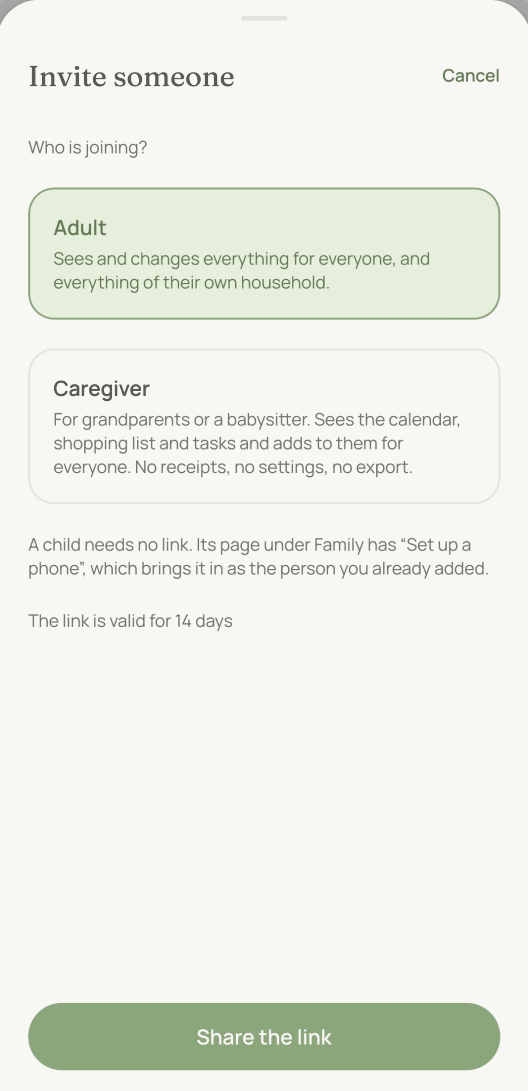
Anyone who helps you out joins with the “Caregiver” role. This role sees the same as a child’s account: the shopping list, your own lists, tasks and appointments. It can also read notes about a person. Unlike a child, it can add things for the whole family.
- Create and change: appointments, tasks and shopping, including for others.
- Take back: only what they added or sent themselves.
- Send: text, voice, photos and PDFs, such as the note from nursery. A photo of a till receipt becomes a task: “Reimburse Grandma Ilse €8.90”. The adults file bills with a payment deadline.
- Not possible: seeing receipts, ideas or goals, settings, export, inviting someone. Inviting is up to the adults.
- Notes: only those that name a person, for reading and writing. Anyone who gives the antibiotic in the evening must be able to read what the doctor said and note down what happened in the afternoon. A note that names nobody stays with the adults.
If nobody is going with a child to an appointment, moj asks the caregiver too, as soon as they see it. If they take it on, the question is settled for everyone.
moj does not only ask about children. If an appointment names only people who cannot get there on their own, moj asks. That means children, even those with their own phone, and people without their own account, such as a great-grandmother.
Some appointments need nobody to go along: school, the club, the bus home. For these the question on “Today” offers “Needs nobody”. The appointment stays, the question goes. Tasks work the same way. Handing in the reading folder needs nobody to take it on.
If the appointment repeats, moj asks whether you mean just this one or every one. Otherwise school would ask again every morning. For the same reason the appointments in a series are shown on one line, with the number after it.
What do the other phones get to see?
The name of your family and one line with the title and the time. Nothing more.
When someone adds an appointment or a task with a date, everyone who sees it gets a short notification. If the task is assigned to someone, only that person gets it. Amounts, notes and attachments never go out with it. A child gets notifications only about their own appointments and tasks.
moj does not tell anyone about a change made in the app. Only “I’ll take it” is shown to the others. If someone moves an appointment by message, the others get “Moved:” with the title and the new time. If someone cancels it by message, they see “Cancelled:”.
One exception is the reminder for a bill that is due. It names the amount, because that is what the reminder is about. It comes from your own phone and not from us, and it goes to nobody else.
moj reminds the people going to an appointment. That means anyone named in it gets a reminder. If you only want to let people know, set the appointment’s reminder to “Off”. The appointment then shows in the calendar but rings for nobody. When you add it, moj tells you how many phones the reminder will reach. If only a child is going, moj reminds the adults the child is with at the time. If the appointment says “Goes alone”, moj reminds only the child, if they have a phone. If nobody is named in an appointment, moj reminds the adults.
If you live apart, you put the handover in the calendar as an appointment: “The children are with me from Friday”. It blocks nothing and names both sides, the children and you. During that time moj reminds you and stops asking who is going along.
And anything that falls due between 21:00 and 07:00 arrives together in the morning instead of one by one at night.
Which two things work without an account?
Two things in moj work without an account, because the device that shows them has none. They are the calendar subscription for Apple Calendar and Google Calendar, and the kitchen display for a tablet in the kitchen.
The address itself is the password. No sign-in protects it. Anyone who has the link sees what it shows. That is why only an adult can create such an address. Each of the two kinds has its own address, and each can be withdrawn: a new one replaces the old one.
Read only, never write. Nothing can be changed through either address. An address that let someone change things would be dangerous as soon as it was passed on.
Every adult has their own. In Settings you see only your addresses, and only you can replace or withdraw them. The other adults’ addresses are not affected.
They show what the person who created them sees. That means their household and everything meant for everyone. They never show anything shared only with individual people. If that person leaves the family, their addresses stop working. Everyone else’s keep working. The kitchen display never shows a gift.
The kitchen display shows 5 days, today included, plus the shopping list. In the app each address shows when it was last fetched.
What cannot be set?
No “everyone but one person”. You choose who sees an entry. You do not choose who should not see it. That means you cannot hide an entry from just one person. The exception is a gift, and moj decides that itself.
No permissions for each member. There are four roles: admin, adult, caregiver and child. We left out a table of permissions for each person. In the end nobody keeps a table like that up to date.
No read receipts. We do not show who has seen what. A family is not a postal service with proof of delivery.
As of 12 October 2026. Who outside your family is involved is set out in the privacy notice.
Short answers
Does everyone in the family see everything?
Almost. The boundary is the family space, not the individual person. Five things narrow that down. An entry created with “Only me” stays with you. You can also share an entry or a list with just a few people. When there are several households, each sees only what concerns it. A child’s account sees less, and so do Grandma or the babysitter with the “Caregiver” role. Gifts are the fifth exception. A gift idea and a task like “Order a present for Mo” stay hidden from exactly the person they are about.
Can I share something with only certain people?
Yes, an appointment, a task or a list. Under “Who sees this”, tap “More” and choose who should see it. You are always included. Nobody else sees it, not even your own household. With “Only me” it stays with you alone.
Does my wife see the gift idea I noted for her?
No. Anything someone else notes for you stays hidden from you. Anything you note for yourself is a wish, and everyone sees it. There is no switch for this: the surprise is the default.
Does my partner read what I send moj?
Yes, if you live in the same household and they are an adult. They can find your messages in the history in Settings. The exceptions are “Only me” and gifts for them.
What does a child not see?
Receipts, attachments, ideas, goals, notes and Settings. A child sees the shopping list, your own lists, the tasks and the calendar. They can add to the lists and tick off their own tasks. They cannot undo, edit people or export.
What do Grandma or the babysitter see?
With the “Caregiver” role they see the shopping list, your own lists, the tasks and the calendar. They can add things there for others too, including appointments. They can read and write notes about a person: anyone who gives the medicine in the evening must be able to read what the doctor found. They do not see receipts, ideas or goals. Settings, export and invitations are left to the adults.
What appears on the lock screen when someone adds something?
The name of your family and one line with the title and the time. Amounts, notes and attachments never go into a notification.
What does a moj widget show on the lock screen?
On the iPhone it shows the next appointment with its time and how much is still left to do today. A bill that is due appears there with its name. Anyone who sees the phone sees this, even without unlocking it. If you do not want that, switch off the widgets’ access under “Settings” › “Face ID & Passcode” › “Allow Access When Locked”. The locked iPhone then shows only a placeholder. Checked with Apple on 9 October 2026.
Who can open the kitchen display?
Anyone who has the address. The address itself is the password. That is why only an adult can create one, each adult their own, and why it can be withdrawn at any time. Nothing can be changed through it.
As of 12 October 2026. How to invite someone: the first steps. What goes to the AI: AI and your data. And where the limits lie: what moj cannot do.
Still have a question?
Send us a line about what you tried to do and what happened instead. We reply to the address you give.
Write to usIn the Swiss App Store since 6 October 2026. Germany and Austria will follow, and Android by the end of the year.